
Amazon listing builder for your PC
Build listings in real time from the catalog Amazon already gives you — no API, no authorization
Listing Simulator is listing optimization software built by Amazon Listing Specialists for Amazon Listing Specialists. Open your Seller Central catalog Excel on Windows or Mac — edit every field in a real UI, check work against Amazon’s own rules, ask Aleksa, generate listing images with ManaQ1 in Image Studio, and export with eyes open. Your catalog never leaves your computer.
What is Listing Simulator?
A desktop workspace for the flat-file catalog reports Amazon already gives you — build, check, image, plan, and export without connecting Seller Central through an API.
Open the file. Start working.
No SP-API, no Seller Central login inside the app. Everyone can use it — open the Excel catalog on your machine and go.
See problems before Amazon does
Checks follow the Must / required logic for your catalog type — so “health” means real upload risk, not a generic score.
Built for listing specialists
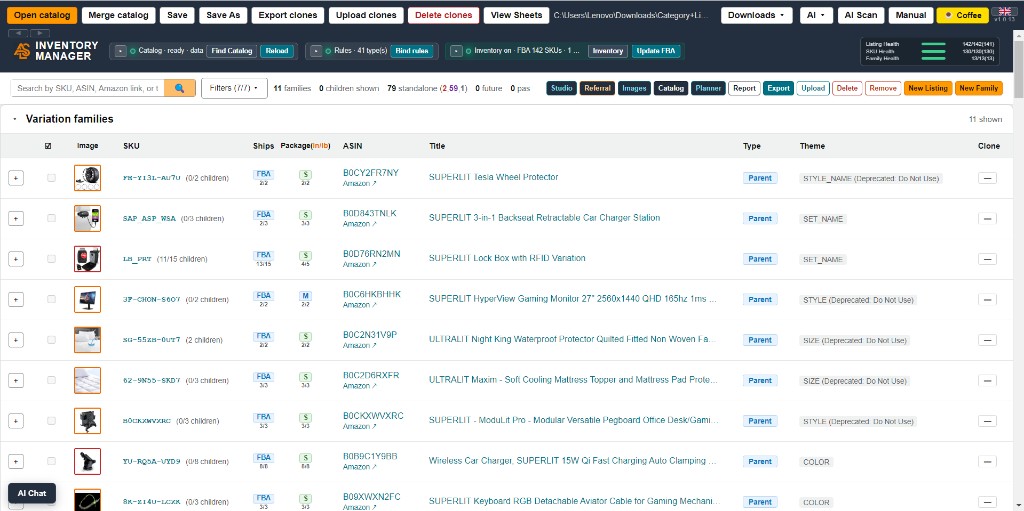
Full inventory view, live listing preview, families, Referral Fee-ready files, images, reports, and planning — in one desktop workspace.
What you can do
The capabilities that matter. The app is deep underneath — these are the selling points.
Listing builder
Build listings and see how they look in real time. Create and edit families and every field in the UI — no digging in the flat file. Copy work, compare side by side, pin what you’re on, and use Referral Fee Connector to shape the workbook into ready upload files. Full inventory view included.
Flat-file — no API
Work from the catalog / inventory Excel Amazon already gives you. No authorization dance, no Seller Central API. Open, edit, save, export on your PC.
Health Check (Amazon’s rules)
Before you upload, see what’s missing or wrong against the same required-field logic Amazon expects for that catalog — explained in plain language on inventory and inside each listing.
AI — Aleksa + ManaQ1
Aleksa understands your catalog and the listing you have open and can help — you bring your own assistant with your own API key. ManaQ1 is the image-generation AI for listing photos. You Accept — nothing ships without you.
Image Studio & bulk upload
Remove background, upscale, enhance, resize. Studio tools for Amazon listing images — including ManaQ1 generation, catalog image scan, and bulk gallery generation. Bulk Image Upload packs the catalog ready for Image Manager.
Export Health
When you export, the app showcases errors clearly — what will likely reject vs what’s advisory — so you fix with eyes open before the file hits Amazon.
Catalog create & sync
Download the catalog as a local hierarchy — Families and Standalones folder by folder — so you can browse and work offline. Merge a fresh inventory file anytime to stay current while keeping the edits you already made.
Report creation
Build an Excel report of what matters to you automatically — choose the fields you care about, get the workbook in seconds.
Inventory Planner
Plan inventory and forecast from your data. Optimizer and AI optimizer where available, plus a fee calculator so storage and fee decisions aren’t a guess.
View Sheets
Need the grid? Open the Excel sheets in-app and edit them directly — same workbook, no separate spreadsheet detour.
Also: Manual in the app, sample catalog, auto-update, and 12 languages.
How it works
From Seller Central file to upload — still no API.
Get your catalog
Download the inventory / catalog report from Seller Central. That’s your flat file — nothing else to authorize.
Open & build
Open it in Listing Simulator. Work the full inventory, create or edit listings and families in the UI, and use AI or Image Studio when it helps.
Check quality
Run Health Check so required-field problems show up before Amazon sees them. Plan stock or pull a report if you need the spreadsheet view.
Export with eyes open
Export the families you need. Export Health surfaces errors; fix or continue knowingly, then upload.
Screenshots
Click a topic to open the gallery — builder, health, studio, export, reports, planner, and more.
Download
Free for personal use. Windows 10/11 (64-bit) or macOS 11+.
v1.0.14 · Windows 168 MB
v1.0.14 · Mac 163 MB
- Windows 10 or 11 (64-bit), or macOS 11+ (Intel / Apple Silicon)
- Amazon catalog Excel files (.xlsx, .xlsm, .xls)
- ~200 MB disk space after install
Comments
Questions, feedback, and tips from other sellers. New comments are held for approval.
Comments are hosted by Cusdis (a third party). Nothing loads until you choose to.